Chrome Port of WebDriver Element Locator
WebDriver Element Locator is a Chrome extension developed by gertdreyer. This free extension is categorized under Browsers and falls under the subcategory of Add-ons & Tools. The purpose of this extension is to provide users with an easy way to locate web elements while using WebDriver.
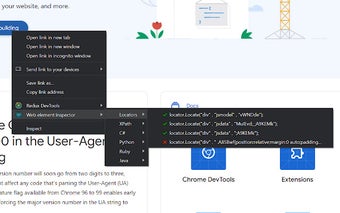
To use this extension, simply right-click on the web element you wish to locate and select an appropriate locator string. The selected locator string will then be copied to your clipboard. The extension aims to make locating elements easier by providing webdriver XPATH-based findElement commands for the dotnet, python, and ruby bindings, as well as Support Locator Library references for the focused web element.
One of the key features of this extension is its ability to check the uniqueness of locators. It visually indicates uniqueness with red crosses and green ticks, helping to prevent buggy tests and saving valuable debugging time. Additionally, if elements have long and fragile auto-generated attributes, the extension will attempt to locate them based on the final and most significant part of the value only. If locating via attributes proves challenging, it will also try to locate elements based on their text value.
After installing the extension, it is recommended to restart your browser to ensure that the extension functions as expected.